Gimble Gaming
How to play
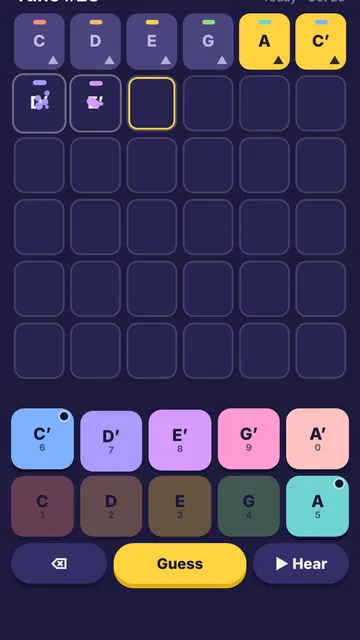
- Tap six notes to build a tune, then press Guess to hear it played back.
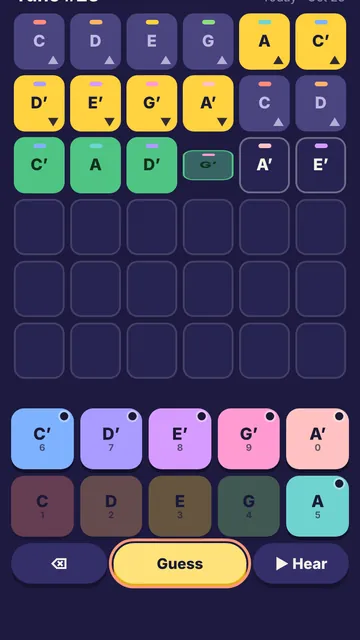
- Green means right note, right spot; yellow means it is elsewhere in the tune; dark means it is not in it.
- Arrows ▲▼ on a tile tell you whether the real note in that spot is higher or lower.
- Solve it in six tries; a new tune comes at midnight, and Archive and Practice let you play more.
Controls
- Touch
- Tap the note keys, then Guess; ⌫ deletes the last note
- Mouse
- Click the note keys, then Guess; ⌫ deletes the last note
- Keyboard
- 1 to 0 for the ten notes, Backspace to delete, Enter to guess, Esc or P to pause
Tips
- The last note is always a C, E or G, low or high, so start your search there.
- Each note is usually just one or two keys away from the note before it.
- Faded note keys are not in the tune at all, so leave them out of your next guess.
- Press ▶ Hear to listen to your notes before you spend a try.
For parents
Ages 7+Parents: A new tune every day, plus practice and past tunes.
Learn: Ear training: hearing which notes are higher or lower
- No ads and no purchases
- No chat and no accounts
- We collect no personal data
- Progress is saved only in this browser